


EV Connect
4.3891.00 Reviews
App Specs
- Version
- 6.1.4
- Updated On
- License
- Free
- Downloads
- 100,000+
- Developer
- EV Connect
- Categories
- Maps & Navigation
- Platform
- Android
Screenshots
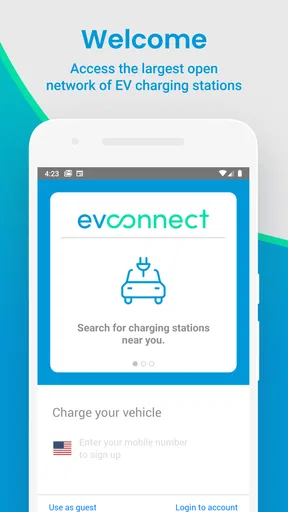
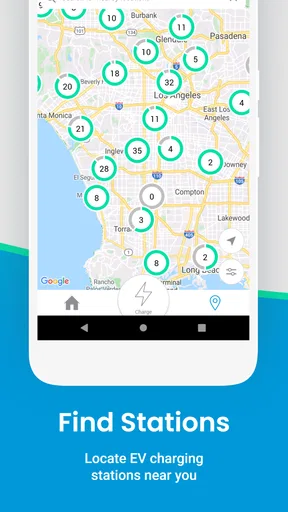
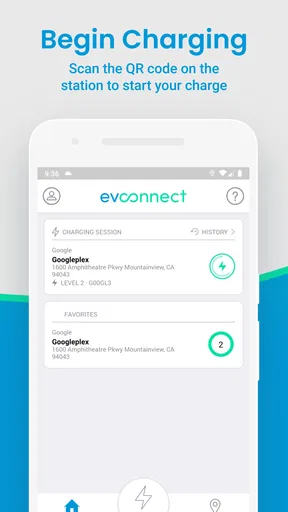
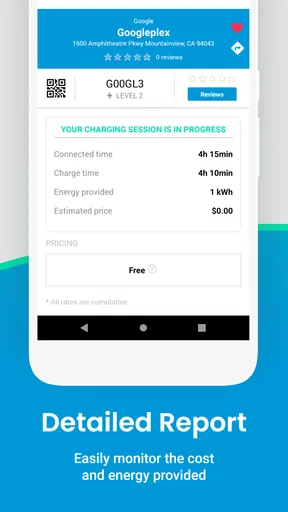
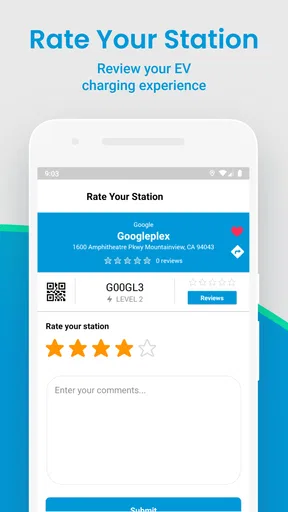
 Analysis by AppCompare
When an electric vehicle is shared by several people, charging stops become a coordination problem as much as a navigation problem. I tested EV Connect with that situation in mind: one driver needs to find a charger after work, another wants to check a route before leaving, and everyone would rather avoid discovering too late that a planned stop is inconvenient. The app is built for charging on the go, but its real value depends on how well it fits into the habits of the people using the car.
EV Connect is a free Maps & Navigation app from EV Connect, and I found its purpose refreshingly focused. It is not trying to replace every navigation tool on a phone. Instead, it gives an EV driver a dedicated place to think about charging while travelling. That focus makes it useful for electric-car owners who want charging information close at hand, especially when a vehicle is used by more than one person.
The app has been available since June 9, 2017, and its current version is 6.1.4. It is suitable for Everyone and runs on Android 7.0 or later. Those details matter in a household because an older spare phone or a shared device may still be part of the routine. I would still check that the phone used in the car meets the minimum system requirement before making it the household’s charging screen.
How EV Connect fits a shared-car routine
When I think about a shared-car routine, the useful question is not just who will open the app, but who will make the final call for each trip. I’d agree on a simple handover: the next driver checks the charging idea against the car’s current charge and their own destination, rather than inheriting yesterday’s plan. That small habit keeps EV Connect helpful without making a shared phone or one driver’s search responsible for everyone.
One car, several drivers, different charging habits
A realistic example is a household with one electric vehicle and three regular drivers. The person commuting in the morning may care about a quick stop near the office. A partner taking the car later may prefer a charger near a supermarket or a familiar destination. A younger driver may need a simple way to understand where charging fits into a journey without changing the vehicle’s routine.
In that setting, I would treat EV Connect as a shared reference point rather than as a personal diary. The app can help each driver look for charging options, but it should not be assumed that one person’s screen automatically represents the plans of everyone else. If a driver checks a location before leaving, the next driver still needs to confirm the route and the practical details for their own trip.
That distinction is easy to overlook. A charging app can help locate a stop, yet the household decision still happens outside the app: who is taking the car, how far they need to go, whether the vehicle needs charging now, and who will handle the next stop. My advice is to agree on a simple rule, such as checking the app before a longer trip and leaving a clear note for the next driver when a charging stop is needed.
Worth Reading Before You Choose

EA SPORTS FC Mobile 26 Is a Bigger Football Game, but It Takes Time

Flipboard Shows What News Apps Must Do Beyond the Feed

Switching to Android Auto Means Rethinking Your Driving Routine

Google Calendar Makes a Crowded Week Easier to Manage

Ludo King Makes the Most of the Minutes Between Plans

Baby Panda World Brings Quick Play to Modern Phones, but Its Game Library Feels Busy
This is one of the app’s strongest household uses: it gives everyone a common place to begin the conversation. It does not remove the need for communication, and I would not rely on it as a substitute for checking the car’s own charge display or confirming the journey in a full navigation tool.
What I would do before handing over the phone
For a shared device, I would install EV Connect on the phone that normally travels with the vehicle, then open it before anyone is in a hurry. The first session is the right time to learn where charging information appears and how the app fits beside the phone’s normal map. Doing this at home is far less stressful than trying to understand a new interface at a roadside stop.
I would also keep the app’s role clear. It is a charging-focused navigation tool, not automatically the household’s complete trip planner. For a long journey, I would use it to investigate charging possibilities and then compare the proposed stop with the route, arrival time, and vehicle range shown by the car or a familiar navigation app. That two-step workflow takes a little longer, but it reduces the chance of treating one screen as the whole travel plan.
Another useful habit is to check the app separately for routine trips and unusual trips. For a daily commute, a driver may quickly learn which charging areas are convenient. For a weekend journey, the same person should start again rather than assuming the usual stop makes sense. Charging needs change with distance, weather, traffic, passengers, and the amount of charge already in the battery.
Account boundaries on a household phone
Shared-device use raises a practical question: should every driver use one account, or should each person handle the app separately? I would avoid making a household decision based on convenience alone. A single account may be simpler for a family that shares one phone, while separate use may feel more comfortable when adults have different travel routines.
The important boundary is not to assume that one person’s activity, preferences, or decisions should automatically stand in for another person’s. Before handing the phone to someone else, I would make sure the next driver knows what has been checked and what still needs checking. If the app presents account-related steps during setup, each adult should read them personally rather than accepting them on another person’s behalf.
This matters even more when the phone is used by a teenager. A young driver can use a charging map as part of learning EV travel, but an adult should still agree on the route, the expected charging plan, and what to do if the first choice is unsuitable. I would not give a child responsibility for interpreting an unfamiliar charging situation alone simply because the app is rated for Everyone.
The Everyone rating describes the app’s age suitability, not a complete family-management system. It does not turn a shared phone into a supervised device, and it does not replace an adult’s judgement about driving, charging, or account access. In my view, that is a healthy way to approach any navigation app: age suitability is helpful context, but trust and responsibility still belong to the household.
Coordinating a trip without overcomplicating it
EV Connect works best in a household when the coordination process stays short. Before a trip, one person can look for a charging option, another can confirm that the destination and timing make sense, and the driver can make the final decision from the car’s actual battery state. This avoids the common mistake of planning a charging stop in isolation from the rest of the journey.
I would use a three-part check. First, identify a charging possibility in the app. Second, compare it with the intended route and the vehicle’s current range. Third, tell the next driver what was decided. That last step can be as simple as a message: “The route includes a charging stop; please check it again before leaving.” The app supports the first part of that process, while the household supplies the rest.
A less obvious advantage of this approach is that it prevents stale assumptions. If someone looked at a charging location in the morning, another person should not assume the same plan remains ideal in the evening. Traffic, battery use, and the driver’s destination may all be different. Rechecking is not wasted effort when the car is shared; it is a way to keep responsibility attached to the person actually making the trip.
I also prefer using a shared charging routine over asking every driver to memorize the app. One person might be comfortable exploring maps, while another only needs to know how to open the app and review a previously discussed stop. That division of effort makes the tool more approachable without pretending that all household members have the same technical confidence.
Where it compares well with ordinary map apps
A general map app is usually better for broad route planning, traffic context, destinations, and familiar turn-by-turn travel. EV Connect has a narrower job, and that can be its advantage. When I am thinking specifically about where an electric vehicle might charge, a dedicated charging app feels more relevant than searching the entire map for a suitable place.
On the other hand, I would not replace a general navigation app with EV Connect for every journey. A household driver who mainly wants directions to a restaurant, school, or workplace may find an ordinary map more natural. The dedicated app becomes more useful when charging is the question that needs answering first.
The best comparison is therefore not “which app wins?” but “which part of the trip is each app responsible for?” I would use EV Connect for charging-focused research, then use the car’s navigation or a broader map for the complete journey when necessary. This division is especially sensible for shared vehicles, because it lets one person investigate charging without forcing everyone to change their preferred navigation habits.
Practical friction I noticed
The focused design also creates limits. A driver who expects one app to handle every detail of an EV journey may find the experience incomplete. Charging information is only one part of a successful stop. The driver still has to consider the vehicle, the route, the timing, and the needs of passengers. I would avoid promising a household that installing this app alone will solve charging uncertainty.
There is also a human friction point: different drivers may interpret the same charging plan differently. One person may see a stop as a backup, while another may assume it is mandatory. That is not a fault unique to EV Connect, but the app can expose the problem because it encourages people to think in terms of charging locations. A clear household rule about whether a suggested stop is optional or required is worth establishing before a long drive.
For that reason, I would not use the app as the sole decision-maker when the battery is low or the journey is unfamiliar. I would cross-check the plan and leave enough margin for a change of mind. The app is most helpful when it is used early, while there is still time to compare options, rather than as a last-second rescue tool.
Who should use it, and who should skip it?
EV Connect is a good fit for an electric-car owner who wants a charging-centered tool and is willing to combine it with normal trip planning. It is particularly practical for a shared household where several people need to understand the same charging routine. The free price also makes it easy to try without adding a subscription decision to the setup process.
I would recommend it to drivers who regularly ask, “Where could I charge during this trip?” rather than only, “How do I get there?” It can also suit a household that keeps an older Android phone in the car, provided that device runs Android 7.0 or newer. That kind of dedicated screen can make charging research available without tying up someone’s personal phone.
I would skip it if you rarely drive an electric vehicle, if you only need ordinary directions, or if you expect a single app to manage every part of a complicated journey automatically. Drivers who already have a trusted all-in-one EV travel workflow may not gain enough from adding another app. In that case, EV Connect is worth considering only if its charging-focused approach fills a specific gap.
What the app’s reach suggests
EV Connect has a 4.3 average from around 2,000 ratings, with close to 900 written reviews, and it has passed 100,000 installs. Those figures suggest that it has found a real audience among people looking for a dedicated charging companion, while also reminding me that popularity does not remove the need to test it against a personal driving routine.
I read that level of adoption as encouraging rather than conclusive. A charging app can be useful to one driver and unnecessary to another because vehicle habits differ so much. The right question is whether it helps your household make better charging decisions with less confusion. If it does, its focused role is worthwhile; if your existing map already covers that need, adding it may simply create another screen to maintain.
My household verdict
After using EV Connect as a shared-car tool, I see it as a practical starting point for charging coordination rather than a complete household travel system. Its value comes from giving drivers a dedicated way to think about charging, while the family still handles communication, responsibility, and final route decisions.
I like the fact that it is free, accessible to a broad age group, and compatible with Android devices from an older generation. I also like its narrow purpose: when charging is the main question, a charging-focused app is easier to approach than a general map filled with unrelated places.
My main advice is to set boundaries before sharing it. Decide who checks a trip, who confirms the plan, and how the next driver will be informed. For teenagers and occasional drivers, pair the app with adult guidance rather than treating the Everyone rating as permission to manage every charging decision alone. For adults sharing one car, recheck the plan for each journey instead of relying on an earlier search.
My final recommendation is to use EV Connect as the household’s charging conversation starter, not as the household’s only source of truth. If you want a focused way to explore charging while keeping your usual navigation tools for the wider trip, it deserves a place on your phone. If you need a fully integrated travel planner or only want basic directions, another option may suit you better.
Pros
- Find and start charging at compatible EV stations with ease.
- Real-time charger availability helps reduce unnecessary trips.
- Supports in-app payment at many participating charging locations.
- Charging session details and costs are clearly displayed.
- Useful for drivers traveling across different charging networks.
Cons
- Station availability may change before you arrive.
- Some chargers require a separate network account or app.
- Pricing can vary significantly between stations and locations.
- Coverage is limited in areas with few participating chargers.
- App performance depends on a stable mobile data connection.
FAQs for EV Connect
What is EV Connect, and what can I use the app for?
EV Connect is a mobile app designed to help electric vehicle drivers find and use compatible charging stations. After creating an account, you can search for nearby chargers, check station details, view availability when supported, start and stop charging sessions, and review charging activity. The exact features can vary by location, station operator, vehicle, and charger compatibility.
Can I use EV Connect with any electric vehicle and charging station?
EV Connect is intended for drivers of electric vehicles and plug-in hybrids, but compatibility is not universal. The app works with participating EV Connect stations and supported partner networks, while your vehicle must also use the correct connector and charging standard. Before driving to a station, check the app’s connector information, power rating, access requirements, and current station status.
Do I need an account or payment method to charge my vehicle?
Most charging sessions require you to create an EV Connect account and add an accepted payment method before charging. Some stations may support guest access, roaming accounts, memberships, or alternative payment options, but availability depends on the station operator. Review the displayed pricing and any possible session, parking, or idle fees before confirming a charge.
How much does charging through EV Connect cost?
Charging prices are not necessarily the same at every location. Rates may be based on energy consumed, charging time, a flat session fee, or a combination of charges, and taxes or station-specific fees may also apply. EV Connect normally displays pricing information in the station details or during the charging process, so check the final rate before starting.
What should I do if a charging session fails or the charger is unavailable?
If a session does not begin, first confirm that the connector is properly inserted, your vehicle is unlocked, the selected charger matches the station number, and your payment method is valid. You can also try starting the session again through the app or using the charger’s available payment option. If the problem continues, use the in-app support details or contact the station operator.


